
Built for residential property teams that need structured housing condition assessments, evidence capture and clear follow-up records.
What is an HHSRS assessment?
The Housing Health and Safety Rating System assesses the risk that deficiencies in a home pose to the health and safety of the people living there. Since 23 June 2026, assessments in England use 21 hazards, baseline indicators and three risk bands. Inventory Base gives your team structured templates to record what was found, the risk judgement, the evidence and what happens next.
Housing Condition Assessment
Record deficiencies room by room against the 21 hazards and the baseline indicators.
Evidence-Led Reporting
Capture photos, notes, locations, severity and supporting observations.
Professional Judgement
Assessors set likelihood, harm and risk band. Inventory Base records the decision and the reasoning behind it.
Follow-Up Actions
Connect findings to repairs, work orders, reinspections and post-works verification.
Audit-Ready Records
Maintain a clear history of what was inspected, found, actioned and verified.
Built around the 21 HHSRS hazards
The HHSRS template follows the four groups and 21 hazards in the June 2026 operating guidance, so every finding is filed against the right hazard and reported the same way across your team.
Hazard names follow the HHSRS operating guidance published on GOV.UK in June 2026. One deficiency can create more than one hazard, so a single finding can be linked to several. Read the operating guidance
Moving from the 29-hazard model
Switch to the 2026 HHSRS at your own pace. Older reports stay readable, and new inspections use the revised hazards and risk bands.
Merged Hazards Mapped
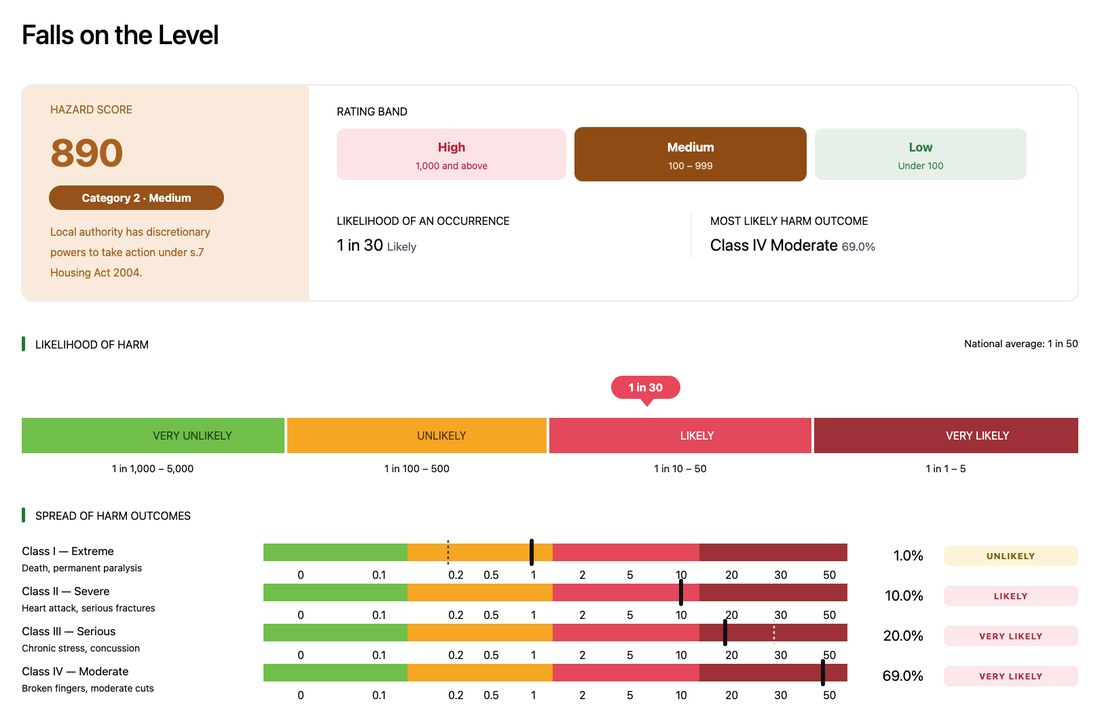
The 2026 template reflects the merged hazards, such as baths now sitting under Falls on the level and fire and explosions as one hazard.
Legacy Records Kept
29-hazard reports stay in Inventory Base, readable and searchable alongside new 2026 assessments.
Three Risk Bands
Reports show High, Medium or Low in place of bands A to J, with Category 1 or 2 alongside.
Switch Over Time
Move teams and clients to the 2026 template when you are ready, starting with new inspections.
Training your team on the 2026 changes? InventoryBase Academy covers the 21 hazards, the new scoring and Awaab's Law.
Explore AcademyWhy structured HHSRS-style assessments matter
Housing condition assessments need consistency, evidence and clear follow-up. Without structured templates, observations can be hard to compare, repair priorities can be unclear and evidence can become disconnected from the actions taken.
Consistent Assessment Records
Use templates to standardise inspections across teams, assessors and providers.
Stronger Evidence Capture
Attach photos, notes, locations and supporting details to each observation.
Clearer Risk Flagging
Mark critical issues, escalation needs or high-priority observations.
Faster Repair Coordination
Connect findings to Schedule of Rates codes, work orders and contractor follow-up.
Better Post-Works Verification
Confirm completed work with before-and-after evidence.
Full Audit Trail
Keep inspection, action, communication and verification records connected.
What should an HHSRS-style assessment include?
A structured HHSRS-style report should capture the property context, deficiency observations, hazard categories, evidence, risk notes, recommendations and follow-up actions.
Property Details
Address, property type, unit/room reference, occupancy context and inspection date.
Inspector / Assessor Details
Record the person or team completing the inspection.
Assessment Framework
The 2026 HHSRS template by default, with legacy 29-hazard or client-specific structures where needed.
Baseline Indicator Checks
Each indicator recorded as met or not met, with any unmet indicator raised as a deficiency.
Hazards and Groups
Each finding linked to one or more of the 21 hazards and its group.
Deficiency Observations
Describe the repair, design, layout, maintenance or management issue observed.
Location Details
Link each observation to property, block, floor, room, area or asset.
Photo Evidence
Attach clear photos to each observation.
Likelihood, Harm and Risk Band
Likelihood, spread of harm, hazard score and the High, Medium or Low band, with Category 1 or 2.
Critical Issue Flags
Mark urgent or high-priority items requiring immediate review.
Damp and Mould Findings
Capture visible damp, mould, condensation, leak or ventilation observations.
Schedule of Rates Codes
Assign repair codes to findings where your workflow uses Schedule of Rates.
Recommended Actions
Record remedial actions, escalation notes or contractor instructions.
Work Order Status
Track whether a finding has been transferred to a work order or repair workflow.
Post-Works Verification
Record before-and-after checks once repairs are completed.
Report History
Maintain delivery, review, comments, changes and audit trail activity.
Check properties against the baseline indicators
Work through prompts for the baseline indicators of a safe, healthy home, then raise a deficiency wherever one is not met. Baseline indicators are not minimum standards: an unmet indicator is a deficiency to be risk assessed, not automatically a Category 1 hazard.
Indicator Checklists
Prompts for heating, insulation, ventilation, electrics, gas, stairs, security, fire safety, kitchens, bathrooms and drainage.
Not Met? Raise a Deficiency
Turn an unmet indicator into a deficiency and link it to one or more of the 21 hazards.
Location-Based Records
Record each check by room, area, external space, block or asset.
Photos and Readings
Attach photos, moisture and temperature readings and notes to each indicator.
Consistent Across Visits
Use the same indicators every time, so results compare across visits and properties.
Recommendations
Add remedial actions, escalation notes or a request for full risk assessment.
Record risk in the language of the 2026 HHSRS
Assessment fields use the same likelihood, harm and risk band terms as the guidance, so reports read the way councils, tribunals and residents expect.
Likelihood
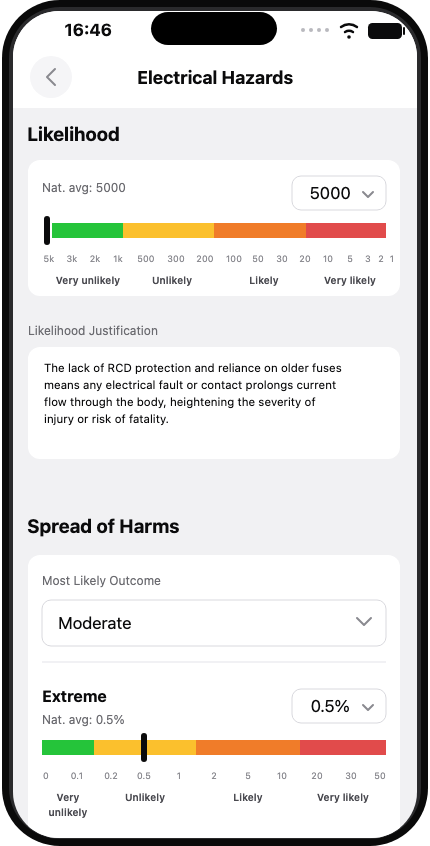
Chance of harm needing medical attention in the next 12 months.
Spread of harm
How likely outcomes split across the four harm classes.
Risk band
The hazard score sets the band shown in the report.
The assessor chooses the likelihood and spread of harm. Inventory Base works out the hazard score and band from those choices and shows them in the report, with the assessor's justification alongside.
Since June 2026, councils in England can issue a civil penalty of up to £7,000 for each Category 1 hazard on first enforcement in qualifying private rented homes, where removing the hazard was reasonably practicable. Clear, dated records of what was found and done matter.
Connect HHSRS-style assessments with damp and mould workflows
Damp, mould, condensation, ventilation and water ingress observations are often central to housing condition and resident safety workflows. Inventory Base helps teams capture visible evidence, resident comments, environmental context and follow-up requirements.
Damp and Mould Evidence
Capture room-level photos, location notes and visible condition observations.
Condensation and Ventilation Notes
Record windows, vents, extractor fans, heating and airflow observations.
Leak and Water Ingress Records
Document staining, pipework issues, roof defects or moisture sources requiring review.
Resident / Tenant Comments
Record reported issues, access notes or communication history where appropriate.
Priority and Escalation Fields
Flag critical damp, mould or hazard observations for faster review.
Follow-Up Actions
Create notes for repairs, cleaning, remediation, reinspection or specialist review.
Ready for Awaab's Law Phase 2
From 30 November 2026, social landlords in England must investigate and fix more significant hazards within set timescales, including excess cold and heat, falls, fire and explosions, electrical hazards, structural collapse and domestic hygiene. Inventory Base timestamps every step, so you can show what was reported, found and done, and when.
Timestamped From First Report
Log when a hazard was reported, inspected, made safe and repaired, with a date and time on every step.
Evidence Kept With the Finding
Photos, readings, notes and resident comments stay with each finding, ready for review or a complaint.
Templates for Phase 2 Hazards
Inspect for the Phase 2 hazards using the same 21-hazard structure as your HHSRS assessments.
Flag critical issues for faster review
HHSRS-style workflows often require teams to identify serious issues quickly and route them to the right people. Inventory Base can help flag critical observations, apply priority fields and create clearer escalation records.
Critical Flags
Mark urgent or high-priority observations requiring review.
Risk Categories
Use configurable high, moderate or low risk fields where appropriate.
Category 1 / Category 2 Context
Record Category 1 or Category 2 context where used by qualified teams.
Escalation Notes
Add management review, specialist review or urgent action notes.
Due Dates
Record target response or review dates.
Responsible Owner
Assign responsibility to internal teams, contractors or specialist providers where configured.
Resident Communication Notes
Record relevant updates, access notes or communication history.
Audit Trail
Maintain a record of flagging, escalation, action and outcome.
Connect findings to Schedule of Rates repair codes
For housing providers and managed service teams, HHSRS-style observations often need to become repair instructions. Inventory Base can help teams assign Schedule of Rates codes, repair categories or internal cost codes to inspection findings.
SoR Code Field
Assign Schedule of Rates codes to deficiencies or repair observations.
Repair Category Mapping
Map hazard observations to repair, maintenance, cleaning or specialist categories.
Cost and Quantity Fields
Record quantities, units or estimated values where your workflow requires them.
Contractor Notes
Create clearer instructions with location, photos and action context.
Work Order Preparation
Prepare inspection findings for transfer into work order systems.
Reporting and Export
Export coded findings for repairs teams, contractors or client reporting.
Transfer assessment findings into work orders
Assessment findings should not sit in a report without follow-up. Inventory Base can help teams move from hazard observation to repair action by transferring findings into work orders, maintenance workflows or contractor instructions where configured.
Work Order Handoff
Transfer findings, notes, photos and SoR codes into repair workflows where supported.
Contractor Instructions
Give contractors clear location, issue, evidence and priority context.
Internal Repairs Workflow
Route findings to repairs managers, maintenance coordinators or property teams.
Status Tracking
Track whether items are open, instructed, in progress, complete or awaiting verification.
Resident Access Notes
Keep access requirements or resident communication notes connected.
Exportable Records
Export findings for systems or teams outside Inventory Base where needed.
Depending on your configuration, this can be handled as work order handoff, workflow transfer, export, integration or contractor instruction rather than universal built-in works management.
Verify repairs with post-works inspections
After remedial work is completed, Inventory Base can help teams verify outcomes, capture before-and-after evidence and keep completion records connected to the original HHSRS-style observation.
Before and After Evidence
Compare original hazard or deficiency evidence with completed works.
Completion Notes
Record whether work appears complete, incomplete or requires further review.
Contractor Evidence
Attach contractor photos, notes or completion documents where used.
Reinspection Checks
Schedule or complete follow-up visits.
Residual Issue Notes
Flag issues that still need action or specialist review.
Audit Trail
Keep assessment, work order, repair and verification records connected.
Complete HHSRS-style assessments on-site
Use the Inventory Base mobile app to work through the 21 hazards and baseline indicators, score likelihood and harm, and capture photo evidence on-site, even offline.
Guided Assessment Templates
Work through the 2026 HHSRS template, or legacy and client-specific versions.
Photo Capture
Attach evidence directly to hazards, deficiencies, rooms or areas.
Voice-to-Text Notes
Record detailed observations quickly during inspection.
Offline Access
Keep working in properties, blocks or areas with limited signal.
Likelihood and Harm Scoring
Score likelihood and spread of harm on-site, with the High, Medium or Low band shown as you go.
Schedule of Rates Coding
Apply repair or SoR codes from the mobile workflow where configured.
Critical Issue Flags
Mark urgent issues for escalation or management review.
Live Syncing
Sync assessment data back to the platform.
Standardise HHSRS-style assessments across your team
Use templates, dictionaries and reusable wording to keep HHSRS-style reports consistent across assessors, teams, providers, clients and housing portfolios.
Legacy 29-Hazard Templates
Maintain older assessment structures for clients and historical workflows.
Updated 2026 Templates
Create new templates aligned with the updated HHSRS framework.
Baseline Indicator Checklists
Add structured prompts for common housing deficiencies.
Hazard and Risk Fields
Configure hazard categories, risk levels, priority fields and escalation notes.
Schedule of Rates Fields
Add repair coding and work order preparation fields.
Dictionaries
Use approved language for observations, recommendations and follow-up notes.
Auto Text
Speed up repeated assessment wording.
Client-Specific Workflows
Adapt templates for housing providers, local authorities, managed service clients or specialist providers.
Branded Reports
Deliver professional reports under your organisation or client brand.
Keep HHSRS evidence, actions and verification connected
Inventory Base helps teams maintain a clear record of assessment evidence, risk flags, repair coding, work order handoff, communication and post-works verification.
Connected Records
Keep assessments linked to work orders and follow-up inspections.
Photo History
Maintain before, during and after evidence.
Document History
Attach supporting documents, reports or contractor evidence.
Recipient Tracking
See when reports are delivered, opened or reviewed.
Comments and Signatures
Keep feedback and acknowledgements connected.
Version History
Maintain visibility of report changes and delivery.
Exportable Evidence
Export PDFs and records where required.
HHSRS-style workflows for residential property teams
Inventory Base supports configurable HHSRS-style assessment workflows across housing, lettings, compliance and specialist inspection teams.
Housing Providers
Support housing condition assessments, repairs evidence, damp and mould response and post-works verification.
Local Authority Housing Teams
Capture structured observations, documents and evidence for housing condition workflows.
Compliance Managers
Manage hazard observations, critical issue flags, repair coding and audit trail records.
Property Managers
Record condition issues, repairs and risk observations across managed properties.
Managed Service Providers
Deliver assessment workflows across multiple clients, properties and regions.
Specialist Providers
Create professional HHSRS-style reports, damp and mould inspections and repair recommendations.
Inventory Providers
Expand from inventory reports into higher-value residential compliance services.
BTR / PBSA Operators
Support building, unit and resident-facing housing condition workflows.
HHSRS assessment tools built into one platform
Related compliance and inspection workflows
Damp & Mould Inspections
Capture damp, mould, condensation, ventilation and resident-reported issues.
Coming soonMaintenance Reporting
Turn assessment findings into repair, contractor and work order workflows.
Explore Maintenance ReportingPost-Works Inspections
Verify completed works and retain before-and-after evidence.
Coming soonVoid Inspections
Check vacant properties for lettable standard, repairs and compliance-readiness.
Explore Void InspectionsBuilding Inspections
Inspect communal areas, internal and external areas, blocks and shared spaces.
Explore Building InspectionsLegionella Risk Assessments
Support water safety and Legionella reporting workflows.
Explore Legionella Risk AssessmentsBuilt for compliance-focused teams
Compliance Managers
Structured evidence capture and HHSRS-style reporting workflows.
Housing Providers
Housing condition, repairs evidence and resident-facing inspection workflows.
Specialist Providers
Specialist residential compliance reports and assessment services.
Managed Service Providers
High-volume inspection delivery across clients, regions and contracts.
Property Managers
Property condition, maintenance and risk observation workflows.
Asset & BTR Managers
Portfolio-scale unit, building and resident safety inspection workflows.